If you own a smartphone that has good camera, than you might be using it for taking selfies, nature snaps and some funny images with your dear ones. Over time, the number of images on your phone builds up. Very soon, you will realize that your gallery is filled with all those memories you have captured with your device. Many images are sometimes embarrassing, wherein you might have been trolled, or might include some private moments with your near and dear ones. So, it’s better to hide images from gallery. In such cases, you do not want anyone else to see your images and rather prefer them keeping to yourself. Luckily, there are certain easy ways that will prevent your private photos from being displayed in gallery.
Use password for your gallery:
This doesn’t seem practical solution, but if you are concerned about privacy, than it is the best option. You can use Applock to lock your gallery, so that user has to enter password before he can access your stuff inside.
Hide images from gallery by creating .nomedia file.
This is one of the easiest tricks for hiding images from gallery by creating nomedia file. When you create this file in particular directory, it prevents Gallery from loading all images and videos from that particular directory. Be careful though, do not create it in root of your SD card, else nothing will be displayed in gallery.
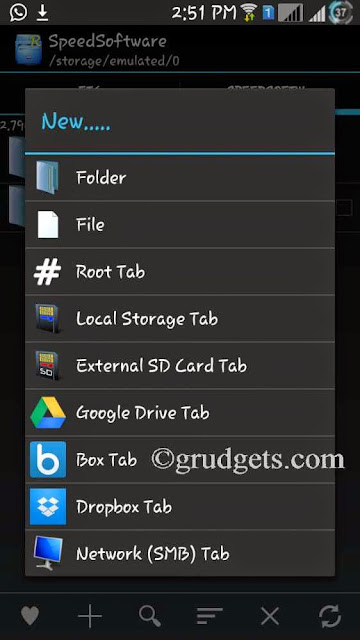
- Use file manager like ES file explorer or File manager. If you have rooted device, than you can use Root explorer. Refer the image below.
- From file manager, navigate to the directory which you want to hide. Click on options and then select create file.
- Create a file named .nomedia into that directory so that all images will be hidden from that particular directory.
- This method will even hide videos from gallery app.
- moreover, you can employ this method for hiding whatsapp images from gallery.
Using an app to hide images from gallery:
If you are not comfortable with this method, or find it too cumbersome, than you can simply use an app. However, I’d recommend using the above app since it does not end up using extra space which will be required for the app.
Related: Reduce data usage in Android by over 50%
App Lock:
This is one of the highest rated apps when it comes for securing your apps and media. It has in-built vault. All you have to do is select the images and put it into vault. All images will be hidden from your device, including gallery and file manager. If you have to access them again, just go to vault and remove them. They will appear in your gallery again. App Lock also includes advanced protection, wherein you can hide the app from app drawer and no one can uninstall it from your device. If you wish to remove it from your device, go to the app, enter code and select “Uninstall” option from the menu. You can download it from here.

Vault:
This app provides pretty similar functions to App Lock. It allows you to create private contact, whose messages, contacts and logs will be disappeared from your device!
The premium version of this app provides “Break-In attempts” feature, which will take image from your front camera if wrong password is entered thrice. It provides an extra layer of security as compared to other apps. Apart from that, the premium version also provides Stealth mode and fake vault.
Which of the above mentioned methods to hide images from gallery did you find useful? Using .nomedia file or app? Is there any other method which you know? Let us know through the comments below!

Hello Mujtaba,
Wow very interesting post at how to hide images from gallery in android devices.I loved your ways how you shared everything step by step. I will share this post with my followers, hope they will love it.
Thanks to share this useful post with us.
Keep up your good work!
Have a great day!
Regards,
Mohd Arif
Thank you for sharing this with us, this is very useful for android users.