Outlook PST repair tool, developed by PCVITA helps in repairing inaccessible (corrupted or damaged) PST file. Recover Outlook emails, journals, contacts, calendars, tasks and all other components from any sort of corruption and also splits large Outlook files in smaller sections. The tool recovers complete components of Outlook PST file and restores them in PST, EML and MSG formats.
Product information- Outlook PST repair tool:
| Product Name | Recover Outlook |
| Developers | PCVITA Software |
| Latest Version | 3.2 |
| Product Size | 3.27 MB |
| Editions Available | Demo and Full |
| Supported PST | ANSI and UNICODE type |
| Download Link | http://www.pcvita.com/recover-outlook.html |
System Requirements:
| Windows OS | Windows 8.1 and all previous versions (32 bit is recommended) |
| MS Outlook | MS Outlook 2013 and previous versions (32 bit is recommended) |
| RAM & Processor | 1GB & 2.4 GHz respectively (minimum 512 MB and 1GHz) |
| Disk Space | 20 MB free drive space |
Pre-requisites for Outlook PST repair tool:
There are some pre-requirements for successful installation and performance of the Outlook PST repair and recovery software, such as:
- MS Outlook installation is must (32 bit is preferred) and it must be configured to POP3 account.
- While conversion, MS Outlook must be closed and is not connected to Exchange Server.
Follow Simple Steps to Know How Software Works:
1) In the first Step, Download & Install Tool.
2) To Open Application: Start >> All Programs >> PC VITA Recover Outlook.
3) Now you will see the first screenshot of the application >> Click Open button to load corrupt PST file.
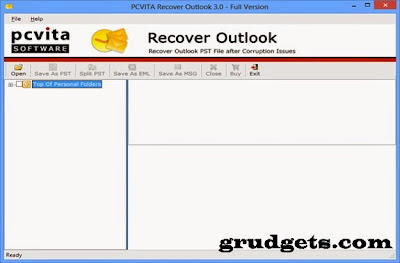
4) Application will start scanning as shown through progress bar.

5) Confirmation message pop-ups after completing scanning.
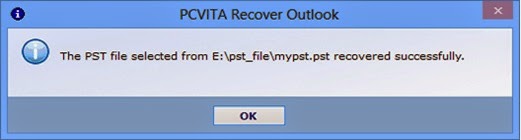
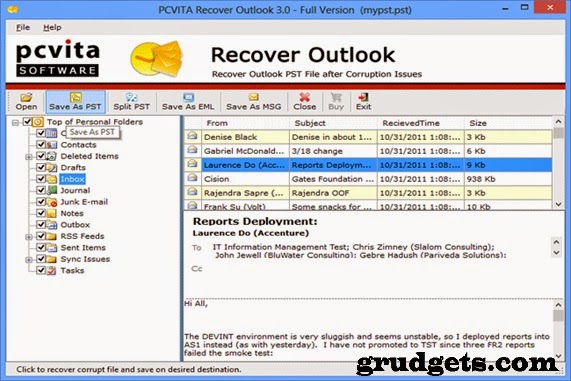
6) Now you can view your all mail items and folder by through a preview. Now press on of required option (Save as PST, Save as EML, Save as MSG and Split PST).To export recovered data into above formats, full version tool is required.
7) Now provide location to save exported data file.
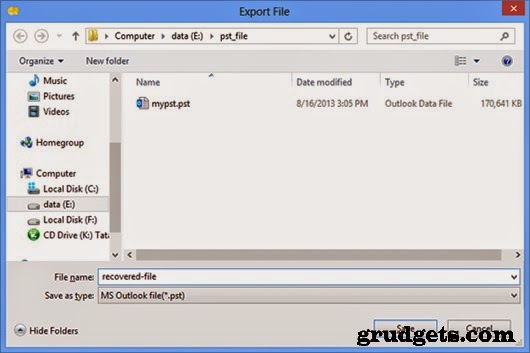
8) Application will start recovering PST file and take time according to size of PST file.

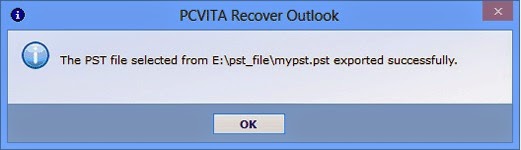
9) After getting over recovery, a confirmation message spark again (xxx.pst exported successfully)
Potential Features of the Product:
The functional features of Outlook data file repair tool is defined below:
- Multiple File Formats: Recovers corrupted files into multiple formats including PST, MSG and EML.
- Maintains Folder Hierarchy: Restores recovered data in its original format while preserving the folder structure.
- Recovers Password Protected PST: Recovers password protected files (if password is known) as well as deleted and corrupted files.
- Splits Large Outlook PST Files: While saving recovered file into PST format, large PST file can be divided into smaller partitions.
- User Defined Destination: Offers to save recovered files at any user defined location on machine.
Related: MBOX to outlook converter review.
Advantages provided by Outlook PST repair tool:
- Recover Outlook emails, journals, to-do lists, contacts, etc. and salvage data from being lost by making it accessible from state of corruption.
- Splitting data into smaller partitions through ‘Split PST’ results in better manageability.
- Saving files as EML format enhances accessibility over multiple email clients.
- Outlook style interface simplifies usability and makes it more user-friendly.
- Demo version is available for testing the performance prior to purchasing the tool.
- Online Support is available for round-the-clock technical assistance.
Drawbacks Related to the Product:
- Does not generate any report or summary for tracking recovered files.
- No provision is available for storing recovered files with appropriate names.
Conclusion Based on Own Experience:
PST files are exposed to corruption just like any other files and recovering them from damage is necessary in order to make them accessible. PCVITA Recover Outlook (PST file repair tool) offers complete recovery of Outlook mailbox data including emails, contacts, calendars, tasks, journals, etc.
As per my experience as a user, I found the software capable of recovering healthy data from corrupt PST files and restores them into multiple file formats without losing even a bit of information; these abilities makes it worth investing upon. So, above mentioned discrepancies can be compromised. Apart from that, trial version and all time support assistance are additional advantages that compelled me to examine and purchase the tool. You can buy Outlook PST repair tool from PC Vita online.


To get Microsoft certified PST repair tool i.e. known as ScanPST.exe. It is a free of cost software i.e. in-built with MS Outlook package.
Recently I used Remo Repair Outlook application to fix corrupted PST file on my Windows PC. This efficiently fixed and restored lost data from it and that too in less span of time. Try once..