PDF unlocker is a commercial application which unlocks the PDF files protected by owner level password. Issues in unlocking PDF files usually downloaded from the web, which came with restrictions are usually confronted. However, the difficulties that were earlier faced in the task of unlocking protected PDF’s have now been lowered to a greater level with the availability of this software.
Testing Environment – PDF Unlocker:
Supportive Windows – Windows 8.1 and all below versions.
Size – 2.8 MB
Version – 3.1
Requirement of Adobe Acrobat – No
- Removes PDF File Security
A PDF file is secured with a high level of security. The data in the file cannot be copied, edited, printed or extracted. PDF unlocker removes the above mention security from a PDF file. The software removes owner level security from a PDF file. Content of the unlocked PDF can then be copied, edited, printed, or extracted.
Moreover, the user can save the file at a desired location.
- Unlock PDF Files In Batch
If there are multiple PDF files having same or special restrictions then it would remove protected PDF files restrictions from all of the files in bulk thus, saving the time. Single user license is available which works on the single file mode only.
So, for bulk operation a Business or Enterprise license of the software is required.
- Maintains File Integrity
The software maintains the data integrity while unlocking and saving the files. No changes are made in the original format of the files. The attachments and other formatting are also kept intact as tested.
- Supports All Adobe Acrobat Versions
The software supports Adobe Acrobat 9 and all below versions with 128 and 256 bit encryption. No issues will be faced in properly running of the software with any of the Adobe Acrobat versions.
- Unlock Password Protected PDF Files.
Owner level password is removed from PDF files. However, if there is a user level password applied on the file then it can also be removed. Only condition is that the password must be known and has to be provided to unlock the document.
The software will automatically prompt you to provide the user level password. And once a file gets unlocked it gets free from a protected state.
- Preview Permissions In PDF Files
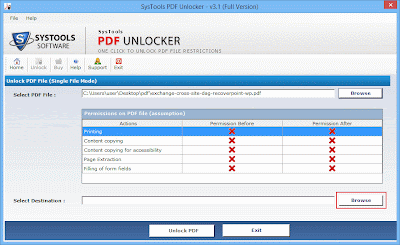
The software lists all the associated permissions as any PDF file is loaded. ‘After’ and ‘Before’ columns are provided to clearly understand the permissions available in the PDF files before and after unlocking it.
On viewing before and after columns one can easily understand the changes made in a particular file.
- Saves File In New Folder
After unlocking the PDF files, the software allows the user to select a desired location for storing the files. Either a location can be chosen and the software will automatically create a folder, or a New Folder can be created right from the software panel to save the output.
- Single Interface
The software has a single interface which makes it user friendly. The user finds all options available on the single interface so it becomes easy to work with. The user will not have to switch between windows or navigate from one to another in the entire process.
- One Time Investment
PDF Unlocker requires just a onetime investment. Unlike other products it does not have to be renewed or subscribed only monthly or early basis. Once the software license has been purchased, it can be worked with for a lifetime.
10.Help Button
The help button provides the option to contact support executives directly from the software panel asking for any help making it a single platform for all solutions. All problems relating to working, downloading and installing of the software is properly explained and tackled.
11.Support Button
Support button provides additional feature to the product. One can have live chat with the experts regarding any problem of the software. The experts provide the best method to solve the problem of the user.
Working of the software:
Step1: Download PDF unlocker software and open it.
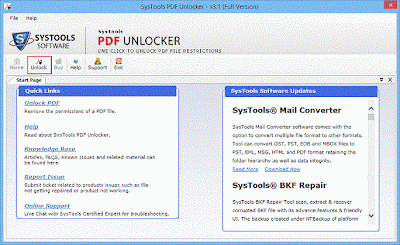
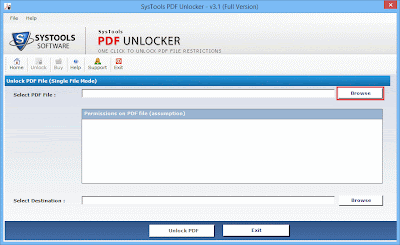
Step 2: Click on Browse and select the PDF files to be unlocked.
Note: – The files must be free from user level password. If the file is locked with user level password, one has to provide the password.
Step 3: Here, a destination location to save the output files has to be provided where you want the unlocked files to be saved.
Step 4: Click on OK.

Pros
- Adobe Acrobat installation is not required which is a strong feature of the product.
- A PDF file generally consists of text files, images, media files, etc. The software maintains the integrity of the data contained in the file.
- Owner password is completely removed.
- There are three licensing of the software which can be selected according to user’s convenience and need.
- Software demands for a onetime investment only.
Cons
- For single user license of the software one cannot add multiple files at a particular time.
- An auto detection feature could decrease the time consumption. Adding of auto detection feature can enhance the speed of unlocking.
Verdict
PDF Unlocker is quite a simple tool. Using it, unlocking of PDF files have become a thing of just a few mouse clicks. It has got apt features and a user friendly interface. And this makes the tool worthy to be spent 29 USD on. On the basis of the software testing, PDF Unlocker can be rated 9/10.

Hey Mujtaba,
Undoubtedly, this is an awesome article creative by you. You really inserted some very interesting
points which force us to think in details. I really enjoyed this article.
Thank you so much for sharing this awesome article with us here.
I wish you the best of luck on your blogging journey.
Have a great weekend!
Regards,
Mohd Arif
Try Softaken PDF Champ